
Learning Beyond the Classroom
At Iqra Primary School, we believe that learning extends beyond the classroom. To support this, we use Microsoft Teams (MS Teams), a secure digital learning platform that lets pupils access learning resources, complete home learning tasks, and stay connected with their teachers.
Through MS Teams, teachers can share learning activities, provide resources and set assignments for pupils to complete at home. Children can access their work, submit completed tasks online and receive feedback from their teachers. This promotes independent learning, develops digital skills, and strengthens the link between learning at school and at home.
Supporting learning beyond the classroom
In the event of a class, year group or whole-school closure, MS Teams enables us to provide continuity of education through remote learning. Pupils will have access to learning resources, pre-recorded teaching videos, live lessons and activities set by school staff.
Our aim is to ensure that pupils continue to receive a broad and balanced curriculum, whether learning in school or remotely. Where remote learning is required, we endeavour to follow our usual curriculum and teaching approaches across all subjects, including English, mathematics, science, physical education, modern foreign languages (MfL) and PSHE.
We may also deliver whole-school assemblies, themed days and special celebrations virtually, helping pupils stay connected to our school community.
Using Microsoft Teams, we aim to create a flexible, accessible learning environment that encourages pupils to take ownership of their learning, build confidence, and continue making progress beyond the classroom.
Other online platforms we use to support learning
MyMaths to support maths learning
Emile to support spelling
Times Tables Rockstars to support multiplications
Guidance on how to access MS Teams
- How to access Microsoft Teams from a mobile phone/ tablet
- How to access Microsoft Teams from a web browser
- How to access 'assignments' on MS Teams
- Instructions on how to log onto school-loaned laptops
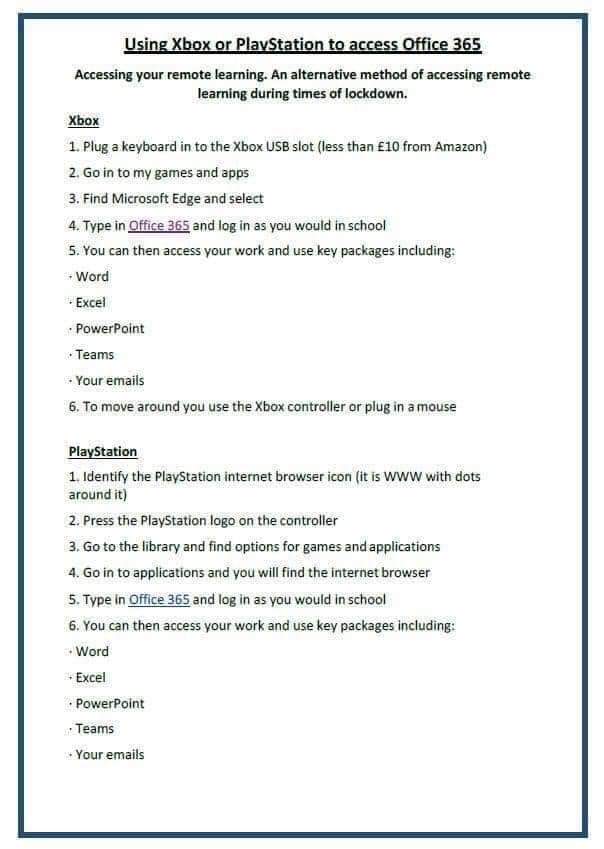
- Guidance on how to access Microsoft Teams using an Xbox or PlayStation 4/5 video demonstration
Videos
Accessing your assignments on MS Teams
Technical support Contact email
If you need support or clarification on any passwords, please contact the dedicated parent online support email at parentconnect@iqra.slough.sch.uk, and we will help.
Policies
- Online Safety policy
- Safeguarding policy
Online safety – Guidance for parents/carers
Click here
As students are spending more time online, we have put together a collection of simple resources for parents. Guidance covers topics ranging from social media use to online gaming.
A guide to watching videos online
Children and young people love watching videos online. In this video we look at the type of content that may be inappropriate and what you can do to help them watch safely.
Visit the following link: Parents' guide to watching videos online for more information.
A guide to social media
In this video, we explore social media, the risks and what you can do as a parent or carer to help your child be safe.
Visit the following link: Is your child ready for social media? For more information.
A guide to in-game chat
While playing games online is often great fun, it’s important you understand why your children will chat online, what risks there are and what measures you can take to protect them while they’re playing their favourite games.
Visit the following link for more information: In-game chat: what parents and carers need to know.
A guide to live-streaming
This video gives you a brief overview of live-streaming and practical tips for your child’s safe use.
Visit the following link for more information: A short guide to live-streaming.
Download Quick guide to livestreaming.
A guide to sharing images
These videos explore why children and young people like to share images, the risks and what you can do as a parent or carer.
A guide to image sharing – secondary aged children
Visit the following link: 7 questions parents ask about nude selfies for more information.
Thinkuknow. An Introduction for Parents and Carers
This presentation introduces you to the ThinkuKnow education programme. The video highlights resources which are available for you and your children and provides ideas on how to keep your child safe online.
You can turn on subtitles in the video, or download the video transcript.
Click here to download the transcript.
The best way to protect your child is to build a positive relationship with them around their online life. Talk to them – not just once, but have ongoing conversations as part of your family life.
A guide to cybersecurity
Visit the following link for more information: Cybersecurity: what parents and carers need to know.
Click on the links below for guidance on each area:
Family activity sheet – viewing videos online
This activity sheet focuses on watching videos online. With a choice of 3 conversation starters, 3 online safety actions, and 2 fun family tasks, you can learn together how to watch videos safely online.
Family activity sheet – cyber security
This activity sheet focuses on cybersecurity and provides ideas from the National Cyber Security Centre to help you be more cyber-aware.
Family Activity sheet – social media
This activity sheet focuses on social media. With a choice of 2 conversation starters (depending on whether your child is on social media), 3 online safety actions, and a fun family task, you can learn together about safer social media use.
Family Activity sheet – sharing images
This activity sheet focuses on sharing images online. With a choice of 3 conversation starters, 3 online safety actions and a fun family task, you can learn together about safer image sharing.
Family Activity sheet – live streaming
This activity sheet focuses on live-streaming. With a choice of 3 conversation starters, 3 online safety actions and a fun family task, you can learn together about how to be safer when live-streaming.
Family Activity sheet – online gaming
This activity sheet focuses on online gaming. With 3 conversation starters, 3 online safety actions, and a fun family task, you can learn together how to play online games more safely.
Keeping safe online
Managing your digital footprint
Digital footprint